Azure Service Bus
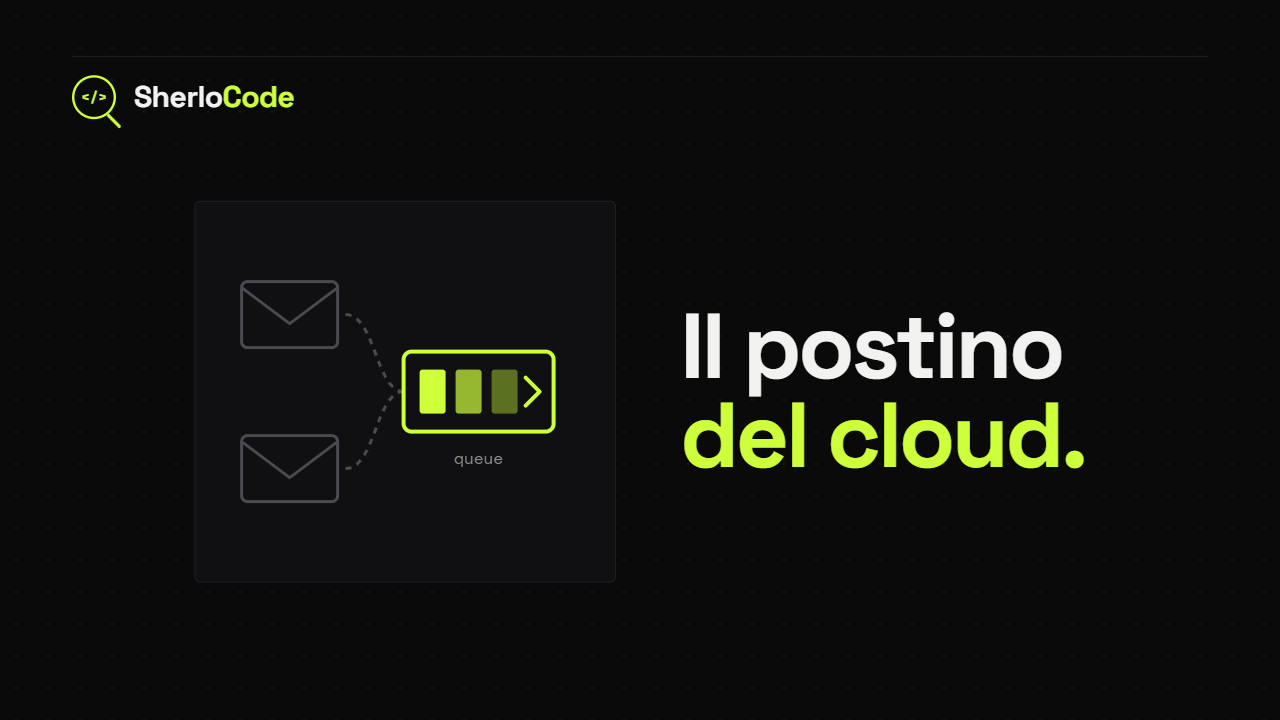
Azure Service Bus is a fully managed message broker that lets different applications and services communicate asynchronously, in a secure and reliable way. I know that definition isn’t very clear yet, so let’s get into the details.
This communication happens through messages in a readable format (JSON, XML or plain text) that are sent to Azure Service Bus; before being stored in the Service Bus they are converted into bytes.
These messages can be delivered to a single service or to more than one. In fact, Azure Service Bus lets us choose between two communication models:
- Queue - A point-to-point channel, that is a communication channel that connects two and only two services, one at each end.
- Pub/Sub - The channel is shared by several services that subscribe (Sub) to a certain Topic (the example below makes it clearer). A good way to picture this mechanism is subscribing to a YouTube channel. When we are interested in a channel we subscribe to it, and when a new video is published we get a notification. The Pub/Sub model works the same way: the channel is the Topic, the subscription is the Sub, and the creator who makes a video is the Publisher that tells all its subscribers a new piece of content is out.
Azure Service Bus can be used in architectures where a flow involves several services that may take different amounts of time to run, and that may or may not be available at a given moment.
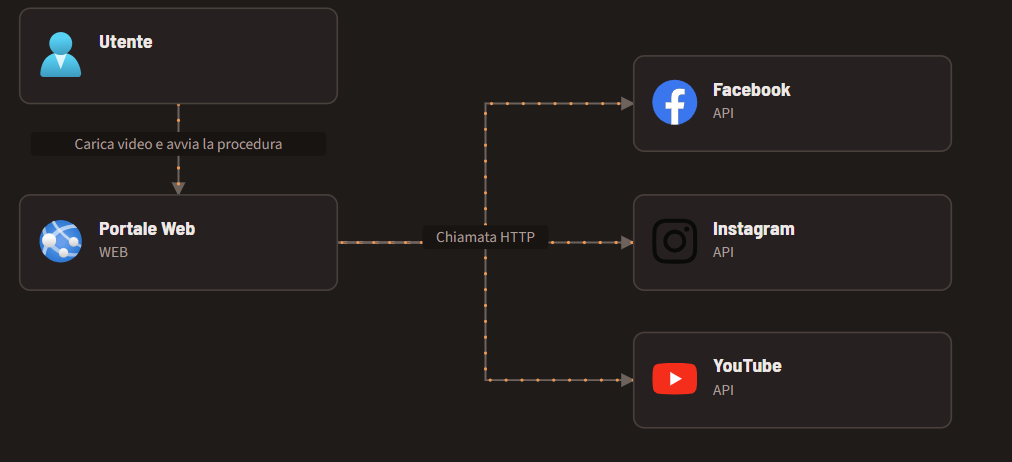
Take as an example a web application that publishes a video on several social platforms (Facebook, YouTube, Instagram). The user signs in, uploads the video, chooses the platforms to publish it on and starts the process. Without Azure Service Bus, the process would have to call the platforms one by one, taking quite some time for the calls and risking errors whenever one of them is temporarily unavailable. All of this means a long wait for the user, who has to wait for the operation to complete before doing anything else.
If we bring Azure Service Bus into the picture instead, once the process starts the application sends a message to the queue, and the subscribers receive it, read it and process it by publishing the video on their platforms. All of this happens asynchronously and transparently for the user, because we decouple this work from our application and hand it over to microservices connected to Azure Service Bus, which make the calls that used to keep the user waiting. And that’s not the only benefit: if an error occurs, the message is not lost but is reprocessed or reported, depending on our needs and configuration.
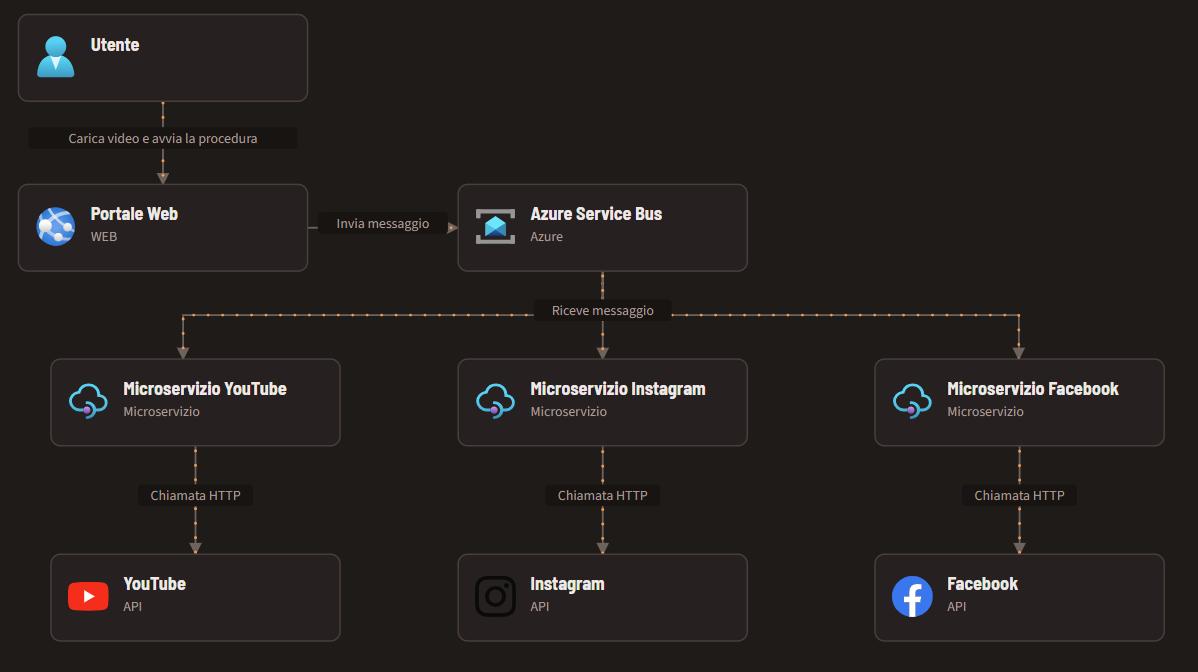
Even this simple example shows that Azure Service Bus is essential for application flows with heavy, concentrated workloads or peaks over time (think of online ticketing portals, which must reliably handle very high loads in a very short time when tickets go on sale).
Features
Azure Service Bus has several features worth mentioning that can be very useful:
Dead Lettering
This feature should not be confused with retrying messages after an error. When a message cannot be processed after a certain amount of time or a certain number of attempts, it is moved to a secondary queue. This secondary queue holds all these messages and lets you analyse what blocked them, to identify bugs or problems in the content, without stopping the normal operation of the system.
An example could be a corrupted video uploaded by the user and rejected by the system. After a certain number of attempts it is moved to the secondary queue, where an operator can analyse the problem.
Subscription filters
You can set filters so that some subscribers don’t receive certain messages in the queue. In the case above, if the user doesn’t want to publish the video on YouTube, there is no point in that subscriber receiving the message, and that’s where filters come in.
Message Sessions
They let you define that a group of messages must be processed in the same session. Take as an example a bank customer with a balance of 0 euros who, in a very short time, deposits 100 euros and withdraws 80. If the withdrawal message is processed before the deposit (because the withdrawal service is faster and runs fewer checks), the withdrawal would fail, since the deposit has not been processed yet.
Message Scheduling
This feature lets you set a date and time from which the message can be processed; before that moment, the message is as if it didn’t exist for the services listening on the Service Bus.
Here too, think of a recurring bank transfer we make every month: the transfer won’t be executed until the date I set.
Duplicate Message Detection
Azure Service Bus automatically detects whether a message is a duplicate and, if it is, discards it without delivering it to the subscribers.
TTL (Time To Live)
Each message has a maximum lifetime; once it expires, the message is deleted and will never be received by the subscribers.
Protocols
The protocols used to communicate with Azure Service Bus are:
- HTTP
- AMQP - Advanced Message Queuing Protocol
Pricing
3 tiers: Basic, Standard and Premium
| Feature | Basic | Standard | Premium |
|---|---|---|---|
| Queues | ✅ | ✅ | ✅ |
| Scheduled messages | ✅ | ✅ | ✅ |
| Topics | ❌ | ✅ | ✅ |
| Transactions | ❌ | ✅ | ✅ |
| De-duplication | ❌ | ✅ | ✅ |
| Sessions | ❌ | ✅ | ✅ |
| ForwardTo/SendVia | ❌ | ✅ | ✅ |
| Message Size | 256 KB | 256 KB | 100 MB |
| Resource isolation | ❌ | ❌ | ✅ |
| Geo-Replication | ❌ | ❌ | ✅ |
| Java Messaging Service (JMS) 2.0 Support | ❌ | ❌ | ✅ |
| Availability Zones (AZ) support | ✅ | ✅ | ✅ |
Integration with Fabric
For Azure Service Bus there is a source, in preview, that ingests data from a queue or from a topic subscription and brings it into Fabric. It has some limitations:
- The Service Bus namespace must be publicly reachable, not behind a firewall or inside a virtual network.
- This source currently doesn’t support CI/CD features, that is Git integration and Deployment Pipelines.