Azure Tables
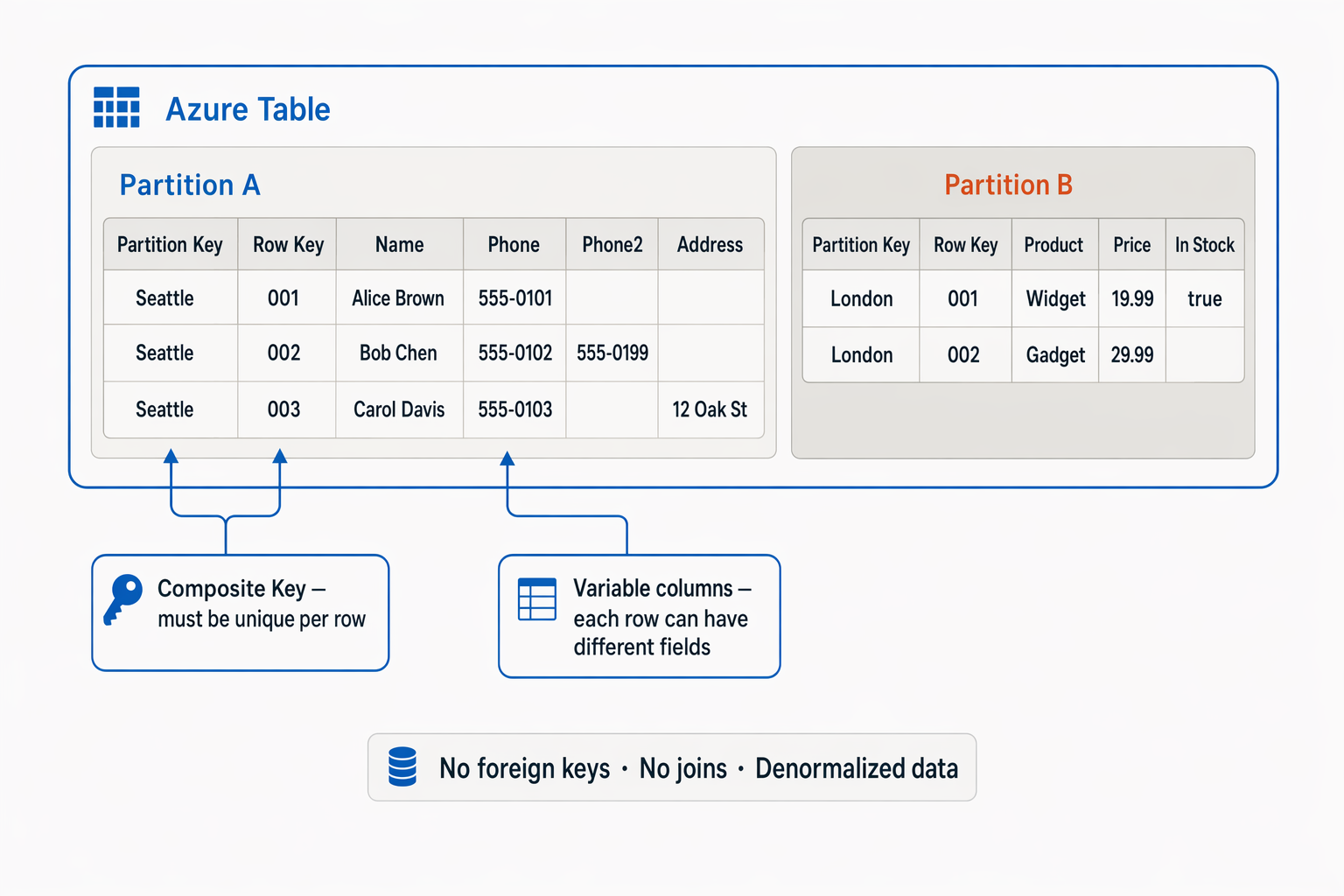
Azure Table Storage is a NoSQL store that keeps data in key/value format. Each item is stored in a row that contains a variable number of columns.
It shouldn’t be confused with a classic relational database, because there are substantial differences:
- As mentioned, you can store a variable number of columns: for example, one row can have 3 address columns while another has only two.
- There are no foreign keys, relationships, stored procedures, views or the other objects common in relational databases.
Each row must have a unique key made of a partition key (which identifies the partition the row belongs to) and a row key (unique within the partition). A partition is simply a mechanism that groups rows by their partition key: rows with the same partition key are stored together. This doesn’t just organise the data, it also improves the performance of operations on it. Partitions are managed automatically and grow or shrink as rows are added or deleted. Using the partition key also reduces read times.
When should you use Azure Tables?
- Large volumes at low cost - Azure Tables is very useful when each row holds little information (few columns) but the store has many rows. If each row holds a lot of information it’s not the right tool, because it allows at most 252 properties and a row size of about 1 MB.
- Semi-structured or variable data
- Typical use cases:
- user profiles and preferences
- application logs
- lookup and configuration tables