Microsoft Fabric
#4 - Microsoft Fabric
Spotted a mistake or something unclear? Let me know in the comments ↓

Microsoft Fabric
Fabric uses OneLake, which provides a shared data lake for all of the organisation’s data. This removes the need to read data from vertical silos tied to a particular area or product, and lets you write and read in a single storage.
Inside it we then find the following components:
- Fabric Lakehouse
- Fabric Warehouse
- Fabric Data Factory
- Power BI
Fabric Data Factory
It is the starting point for managing and creating pipelines for data ingestion. These can be built mainly with two tools:
- Pipelines
- Dataflows Gen2 - a low-code tool that lets you create and update data transformation logic through a visual interface. It is based on Power Query.
OneLake Shortcuts
These are essentially shortcuts that let you reference external storage (such as Azure SQL Database, Azure Cosmos DB, but also others outside the Azure ecosystem) from within OneLake. The data, however, is not copied or moved into OneLake. They are mainly used when the data cannot be moved out of its region for legal or cost reasons.
Mirroring
In this case, instead, the data is replicated directly into OneLake in real time. This tool handles the replication automatically, managing the updating and creation of data without the need to build a pipeline. The data arrives in OneLake in a format that is already ready to be queried with analytics tools.
Eventstream
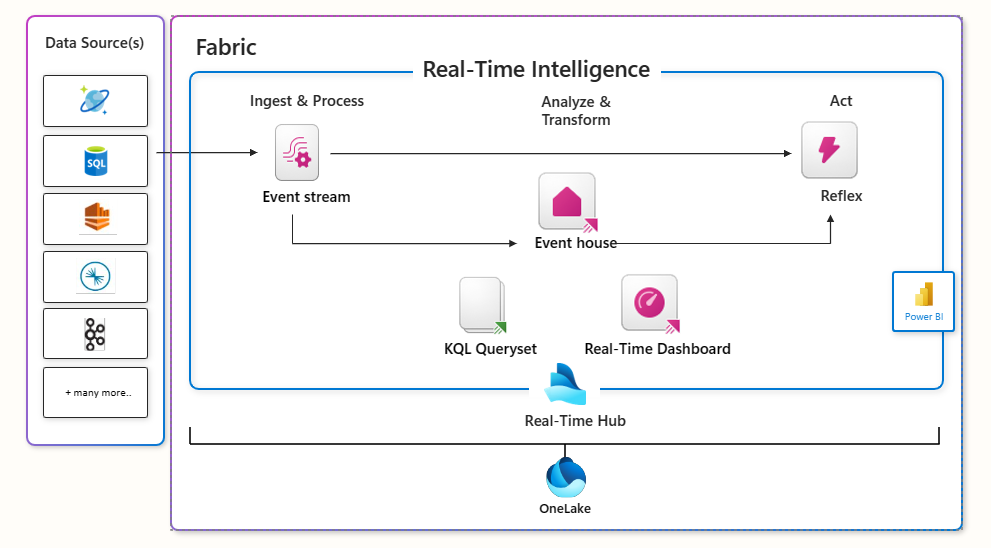
A tool for ingesting real-time sources that can connect to event sources such as Azure Event Hub, Apache Kafka or custom endpoints. Once connected, it filters and transforms the data before storing it in Fabric Lakehouse.
Microsoft Fabric Real-Time Intelligence
It is a set of tools in Fabric that lets you capture, process and analyse streaming data. Together, the tools inside it let you build the entire data processing pipeline, from capturing the data all the way to visualising it and automating certain actions based on the data captured.
In practice, we connect to a data source, store and query the data, build real-time dashboards and set up notifications or alerts when certain conditions are met (for example: if a sensor reading reaches a certain value, I can send an email).
Apache Spark
Apache Spark is a data processing engine that lets you handle large datasets quickly. Nothing new so far. One thing that sets it apart, though, is that processing is not carried out on just a single machine, but on several (called a cluster), which allows processing to run in parallel and improves performance. This engine lets you write code in several languages (R, Python, Scala, Java and SQL) and can handle both batch and stream processing.
Spark can be used both in Microsoft Fabric and in Azure Databricks.
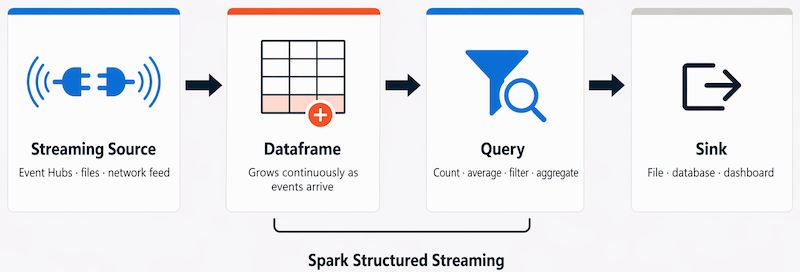
Within Spark we find Spark Structured Streaming. This is a library that makes working with streaming data easier. To understand how it works, we can compare handling streaming data to the way we handle tables in an Excel worksheet, except that the data grows in real time.
In detail:
- We connect to a streaming source - for example, a message queue such as Azure Event Hubs
- Spark reads the incoming data and stores it in a dataframe - a table with rows and columns where data is saved as soon as it arrives
- We write queries to interrogate this data
- The output of the query is written to an output (called a sink), which can be a file, a database or a dashboard.