Real-time processing
#3 - Real-time processing
Spotted a mistake or something unclear? Let me know in the comments ↓
Introduction
Data processing means converting raw data into useful information through processing. Generally, there are two ways of processing data:
- Batch - Data is collected and stored as it is before being processed together (in a batch) in a single operation
- Stream - a data source is continuously monitored and processed in real time to obtain new data
Batch processing
As mentioned, new data is collected and stored, after which the entire group of data is processed together in a batch. How it is processed can be chosen in various ways: for example, you can process it by defining a certain time period (for example, an hour) or by defining a threshold on the number of records waiting to be processed. A practical example could be the accounting of credit card transactions, which happens at the end of the month.
Stream processing
In stream processing, instead, every single piece of data that arrives is processed immediately, so there are no waiting times tied to thresholds or time periods. This approach is ideal for operations that need to be handled as quickly as possible and require a real-time response. An example could be a fire alarm sensor.
Differences between batch and stream
- Data window - batch processes all the data in the dataset, whereas stream processes only the most recent data it has received
- Data size - Batch is ideal for handling a very large dataset, whereas stream, by its nature, is better suited to processing single units of data or very small batches
- Performance - Latency is defined as the time between when I receive the data and when I process it. With batch processing this can be a few hours, whereas with stream it is almost real time, in the order of seconds / milliseconds.
- Analysis - Batch is used for complex analysis, whereas stream is used to run simple functions, aggregations or calculations
Combining batch and stream
Solutions that analyse large amounts of data usually combine the two approaches to get the advantages of both.
Typically, stream processing is set up to have the most up-to-date data possible, and real-time dashboards are built on top of it to consume the data (for example, a dashboard showing the current status of fire alarm sensors). Meanwhile, the processed data is stored in a storage so that batch processing can then be run on the historical data (for example, an analysis to understand how many fires occur during the year and at what times).
Below is a diagram describing a lambda architecture, a common pattern that combines batch and stream processing.
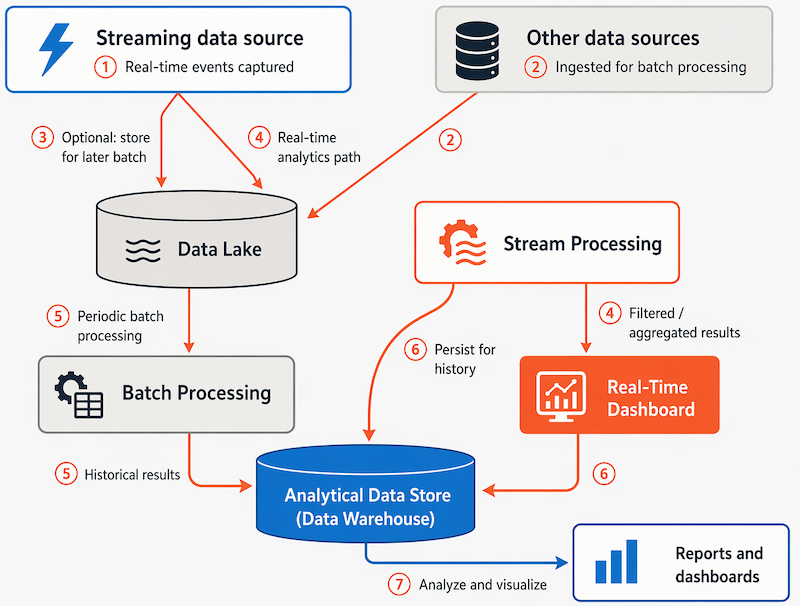
In detail, it is structured as follows:
- Data from a stream source is captured in real time
- Other data from other sources is captured and stored in a data storage (often a data lake) for batch processing
- If the data captured in real time does not need to be processed immediately, it is saved in a data storage so that it, too, can be processed in batch
- If, instead, the data needs to be processed in real time, stream processing is set up to process the data captured in real time and consume it through real-time visualisations or analysis. This process usually involves filtering and aggregating the data over a very short time window
- Data that does not come from the stream source is processed in batch periodically and prepared for analysis. The result of the processing is saved in an analytical data store (a data warehouse) so that analysis can then be run on the historical data.
- The result of stream processing can also be saved in the data warehouse to enrich the historical information
- Analytics and visualisation tools are used to show and explore both real-time and historical data
Architecture for stream processing
At a high level, an architecture for stream processing looks like this
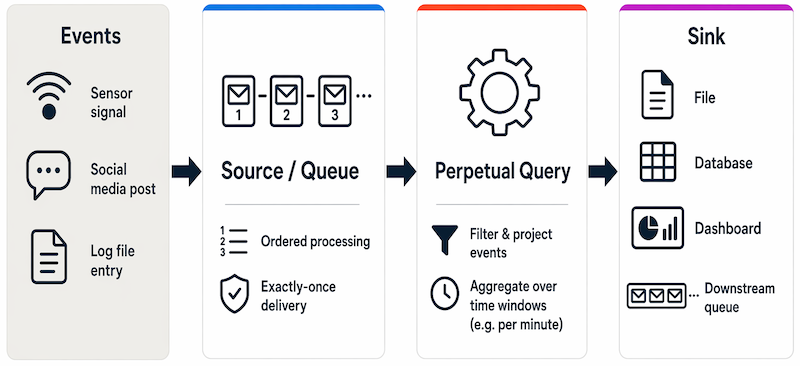
First, a source generates data, which can be signals emitted by sensors, a post on social media, or a log file being written. The generated data is then captured in a stream source for processing; in the simplest cases this can be a folder in the cloud or a table in a database. In more complex cases the source can be a queue that allows events to be processed in order and only once.
The data related to the event is processed, often using a perpetual query - a type of query that continuously processes data coming from real-time events as soon as they are generated. In this case, the perpetual query operates on the events by selecting data from certain types of events and aggregating the data over time periods. The final result is written to an output, also called a sink, which can be a file, a database table, a real-time dashboard or another queue for further processing.